
User guide · Practising alone
Rehearse on your own
ChordCast is built for playing with others, but most of the work happens alone: learning the tunes, getting the keys under your fingers, working out a part. These are the tools for that.
Read in your instrument's key
If you play a transposing instrument, choose it once under My Instrument in a chart's key panel: B♭ for a trumpet, clarinet or tenor sax, E♭ for an alto or bari, F for a horn. Every chart on that device is then shown in your key, whatever key the band uses, and nobody else's chart changes. To work on a tune in another key, change its Song Key instead. See Key and zoom.
Check a tempo
Open a song with a tempo and the tempo dot blinks it for sixteen beats: enough to set the tempo in your head before you count off. To find or set a song's tempo, open the editor's Chart Settings and use Tap: tap along with a recording, and ChordCast works out the beats per minute.
Roll Chords: a progression to practise over
Roll Chords (the dice in the library's toolbar, on iPhone, iPad and Mac) makes up a chord progression in a style you choose (classic swing, bebop, modal jazz, bossa nova, blues, gospel, funk, neo-soul, rock and more) or Surprise Me, in forms from a 12-bar AAB to a 32-bar AABA. It's for practising improvisation, comping or ear training over changes you haven't seen before.
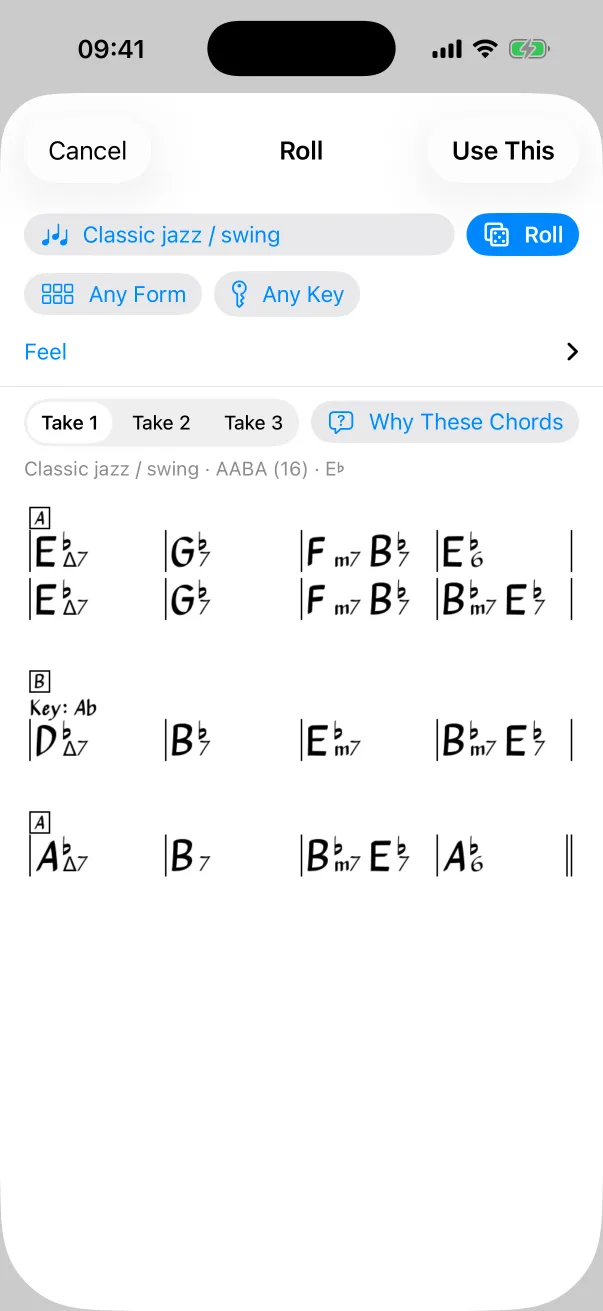
- Pick a Style, and optionally a Form and a Key, then tap Roll (⌘R on a Mac).
- Feel has five sliders: Safe to Adventurous, Plain to Rich, Slow changes to Busy, Straight to Pushes, and Stay in key to Key changes. Reset to the Style puts them back.
- Each roll comes in three takes; flip between Take 1, 2 and 3.
- Why These Chords explains the choices: useful for learning how progressions are built.
- Use This saves the take as an ordinary chart in your library and opens it. If you're leading a band, it opens on everyone's screen, ready for a jam.
The experimental backing band
ChordCast is testing a backing band: piano, bass and drums that play the chart you're looking at, with a play bar on the chart. It's experimental and off by default. To try it, turn on Settings → Experimental → Playback; it takes effect the next time a chart opens. Its instrument sounds download the first time and stay on the device. On a Mac, View → Show Player (⌥⌘P) shows and hides it.
If a full-featured play-along band is what you practise with every day, a dedicated practice app may suit you better for now. See using both.
Learn a chart, then fix it
- Found a wrong chord while practising? Tap Edit, tap the chord, fix it. If the song is in a shared setlist, the fix reaches the band.
- Write in the hits and stops you hear on the record with rhythms, and the head or a riff as a melody part.
- Duplicate a song (touch and hold it in the library) to keep your own practice version without touching the band's.