
Article · Choosing an app
iReal Pro alternatives for bands: what to look for, and where ChordCast fits
iReal Pro is one of the best practice tools a musician can own. But a lot of people searching for an alternative aren't unhappy with it as a practice app. They need something different for the band: one chart on every stand, the same key for everyone, and changes that reach the whole group. Here's what to look for, and an honest comparison with ChordCast.
Updated
What iReal Pro does best
It's worth being clear about why so many musicians use iReal Pro, because an alternative that ignores these things isn't one. According to iReal Pro's own pages:
- A backing band to practise with: 50+ accompaniment styles included, with more available as in-app purchases.
- Practice controls: change the tempo, loop a hard section, transpose to any key, and transpose globally for E♭, B♭, F and G instruments.
- A huge shared library: thousands of chord charts shared by its community on the iReal Pro forums, free to download.
- Learning aids: guitar, ukulele and piano chord diagrams, and scale suggestions for improvising.
- Exports: charts as PDF or MusicXML, backing tracks as audio or MIDI.
- Everywhere: versions for iPhone and iPad, Mac, Android, Windows and Linux, each a one-time purchase for its platform, with no subscription.
If what you need is a play-along band for the practice room, it's hard to beat.
What a band needs from a chart app
On a gig or in a rehearsal, the questions are different. Before choosing an app for your band, check whether it can do these:
- Put everyone on the same song. When the bandleader calls the next tune, does every player's screen go there, or does everyone scroll for it?
- Call a key once. If the singer wants it a tone down tonight, does that reach the band, while the horn players still read in their own transposition?
- Share fixes. When someone corrects bar 9 at rehearsal, does everyone have the correction at the gig?
- Work without internet. Plenty of venues have no signal.
- Mix devices. The guitarist has an Android phone, the keyboard player a Mac, the sub a borrowed tablet.
- Show how, not just what. The hits, the stop before the chorus, the horn line.
- Bring your existing charts. Nobody wants to retype a book of tunes.
iReal Pro's pages describe sharing songs and playlists as files or forum posts, and syncing your own Apple devices through iCloud. They don't describe a way for a whole band's devices to follow one leader live. Its help pages also say plainly that iReal Pro doesn't include melodies or lyrics, because of copyright and licensing. That's a reasonable choice for a practice app; it's also why bands look elsewhere.
Where ChordCast fits
ChordCast is a chord-chart app built around the band. It's in beta, free while it's tested, on iPhone, iPad, Mac, Android and the web. Here's how it lines up against the list above.
Everyone on the same chart, without Wi-Fi
Players nearby join a band over Bluetooth. The leader picks a song and every screen follows, usually within a second; a new key goes to everyone, and each player can keep a personal offset for their instrument on top. No internet or accounts are involved. How band sync works.
Setlists the whole band can edit
Share a setlist with an edit link for bandmates and a view-only link for subs. It opens in the app or any browser, edits from different people merge, and it keeps working offline. Sharing with a link.
Rhythms and melody parts, not just chords
A ChordCast chart can carry written rhythms on a staff (hits, pushes, ties, rests) wherever the band has to play together, and leave the rest as a grid. Melody, horn and riff lines can travel with the chart as parts in ABC notation: on by default in the web app, and an experimental setting in the apps for now.
%TITLE="Rhythm figures"

[Hits]
| F7:4. F7:8 r:2 | Bb7:4. Bb7:8 r:2 |
| F7:8 F7:8 r:4 F7:4 r:4 | C7:2 Bb7:4 F7:4~ | :1 |

[Push and triplets]
| Dm7:2 G7:2 | <:8 CM7:1 |
| Dm7:4_3 Em7:4_3 FM7:4_3 G7:2 | C:1 |Bring your iReal Pro library
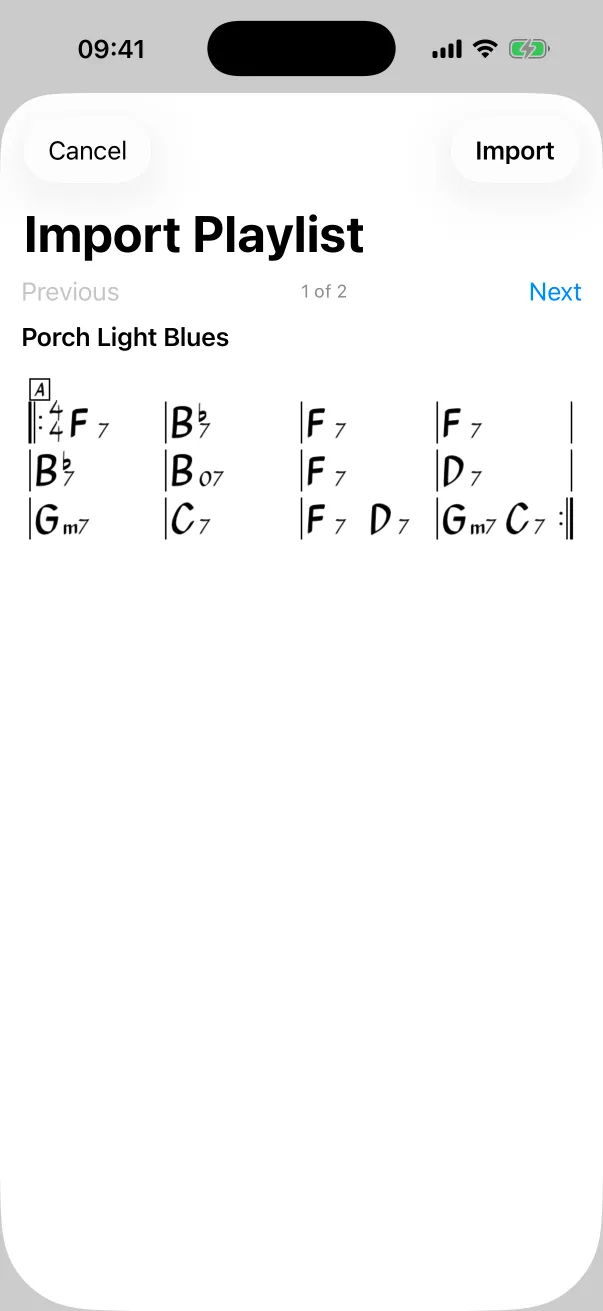
ChordCast imports iReal Pro songs and playlists: tap a link, share an exported playlist to it, paste it, or browse the iReal Pro forums from inside the app. Chords, sections, repeats, endings, codas, time signatures, the key, the style and the tempo come across; a playlist becomes a setlist. Importing from iReal Pro.
A nice extra at gigs: the tempo dot
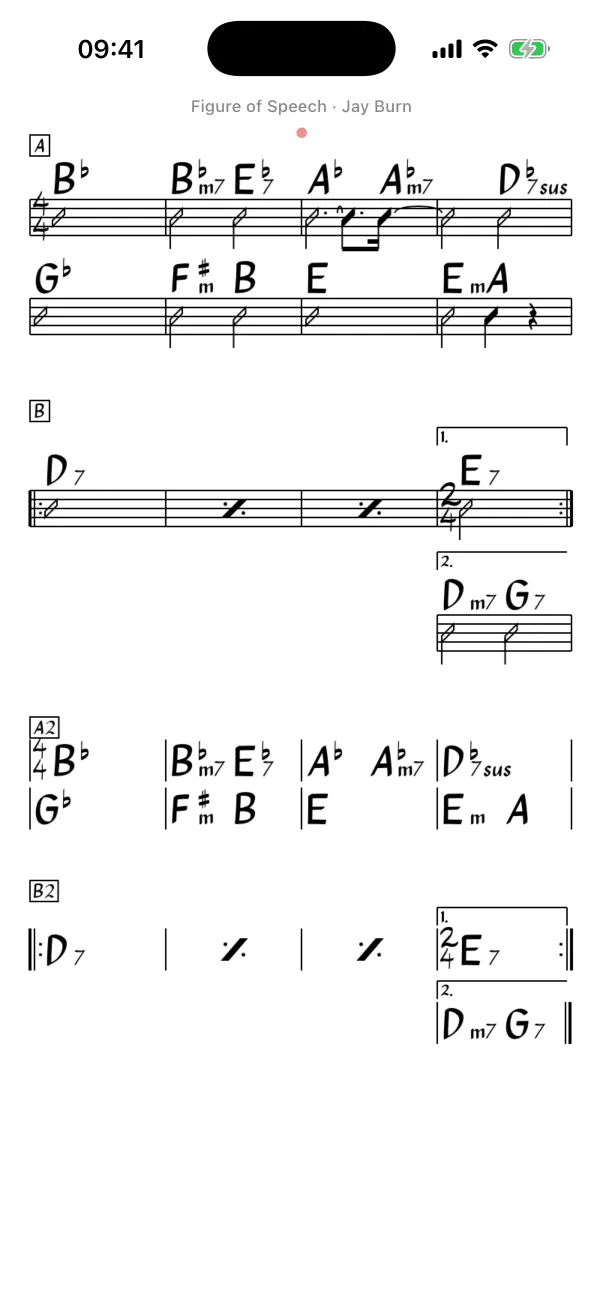
Counting off at the right tempo after a loud song is harder than it sounds. When a song with a tempo opens, ChordCast blinks a small red dot at the top of the chart for sixteen beats, bigger on each downbeat, then it's gone. It makes no sound, so only you see it. Tempos come across from iReal Pro imports, or you can tap one in. More about the tempo dot.
Side by side
| iReal Pro | ChordCast | |
|---|---|---|
| Backing band to practise with | Yes, 50+ styles included | Experimental (piano, bass and drums), off by default |
| Chart library | Thousands of community charts on its forums | Imports them, from links, exported playlists or the forums |
| Band follows one leader live | Not described on its pages | Yes, over Bluetooth, no internet needed |
| Shared, editable setlists | Share songs and playlists as files or forum posts; iCloud sync between your own Apple devices | Edit and view-only links; edits merge; works in a browser and offline |
| Written rhythms on a staff | Not described as a chart feature | Yes |
| Melodies | Not included, per its help pages | Melody parts in ABC notation (experimental in the apps) |
| Tempo cue | Audible count-in, and the current bar highlights during playback | Silent tempo dot when a song opens |
| Platforms | iPhone and iPad, Mac, Android, Windows, Linux (bought separately) | iPhone, iPad, Mac, Android, web browser |
| Price | One-time purchase per platform | Free during the beta |
Using both
Plenty of musicians will keep iReal Pro for practice and use something else on the bandstand, and that's a sensible split. Practise with iReal Pro's backing band; when a tune is ready for the band, import it into ChordCast, add the hits, set the band's key, and share it with everyone. ChordCast doesn't export back to iReal Pro, so treat ChordCast as the band's copy from then on.
Other kinds of alternative
- PDF and sheet-music readers are good when your band reads full arrangements. They can't transpose a chord chart, and a fixed PDF has to be redistributed whenever it changes.
- Lyrics-and-chords songbook apps suit singer-songwriters and worship teams who play from chords over lyrics more than from chord charts.
- Desktop arranging software generates full backing tracks, but it isn't something you read from on stage.
Whichever you choose, run it past the seven questions above with your actual band before the next gig.
Questions
Can ChordCast open iReal Pro links?
Yes. Song and playlist links (irealb://), exported playlist files and the iReal Pro forums all work. See the import guide.
Is ChordCast free?
It's free while it's in beta, on every platform.
Does it work without internet?
Yes. Your charts live on your device, and band sync uses Bluetooth. Read A setlist app that works without internet.
Is ChordCast affiliated with iReal Pro?
No. iReal Pro is a trademark of its owner; ChordCast is an independent app that can read its charts.
Sources
Facts about iReal Pro come from its own pages, read in November 2026: irealpro.com, iReal Pro on the Mac App Store, its in-app style packs, sharing a song or playlist, syncing with iCloud, playing a song, and its help centre on melody and lyrics and multiple devices and platforms. Features change; check there for the current picture.