
Article · Band logistics
How to share chord charts with your band (and keep everyone on the same song)
Most bands share charts the way they share everything else: a PDF in the group chat, a folder somebody set up years ago, a photo of a page. It works until the singer moves a song down a tone, someone fixes the bridge, or the sub opens last month's version. Here's a way of sharing charts that holds up at the gig.
Updated
Why the usual ways break down
- Copies drift. Every time a PDF is sent, there's a new copy. Fix a chord in one and the others are wrong.
- Keys are baked in. A PDF in G is in G. If the song moves to F tonight, someone has to make and send a new one, and the horn players need theirs transposed again.
- The set order lives somewhere else. The setlist is a text message; the charts are in a folder; on stage, everyone scrolls.
- The venue has no signal. Cloud folders are no help in a basement.
What good sharing looks like
- One setlist, many devices. Everyone opens the same setlist, in the same order, with the same charts. A change by anyone reaches everyone.
- Keys as a setting, not a file. The band's key for each song is part of the setlist; each player's own transposition stays on their own device.
- Different access for different people. Bandmates can edit. A sub or the sound engineer can read but not change.
- No accounts to chase. A link should be enough, and it should open in a browser for someone who hasn't installed anything.
- On stage, a leader. When the bandleader calls the next song, every screen goes there, with or without internet.
Before the gig: share a setlist with a link
In ChordCast, a setlist shared to the cloud gets two links:
- an edit link for bandmates (and your own other devices), who can reorder songs, set keys and fix charts;
- a view-only link for a sub, the sound tech, or a tablet on a music stand.
Send them in the group chat, or show a QR code at rehearsal. People open the link in the ChordCast app or right in a web browser; nobody makes an account. When two people edit the same chart, their edits merge bar by bar; when two people reorder and add songs at once, both changes stick. It keeps working offline and catches up later.
With no accounts, the link itself is the key: whoever has the edit link can edit. Keep it to the band, give everyone else the view-only link, and if an edit link ends up somewhere it shouldn't, change it and remove anyone who shouldn't be in (how).
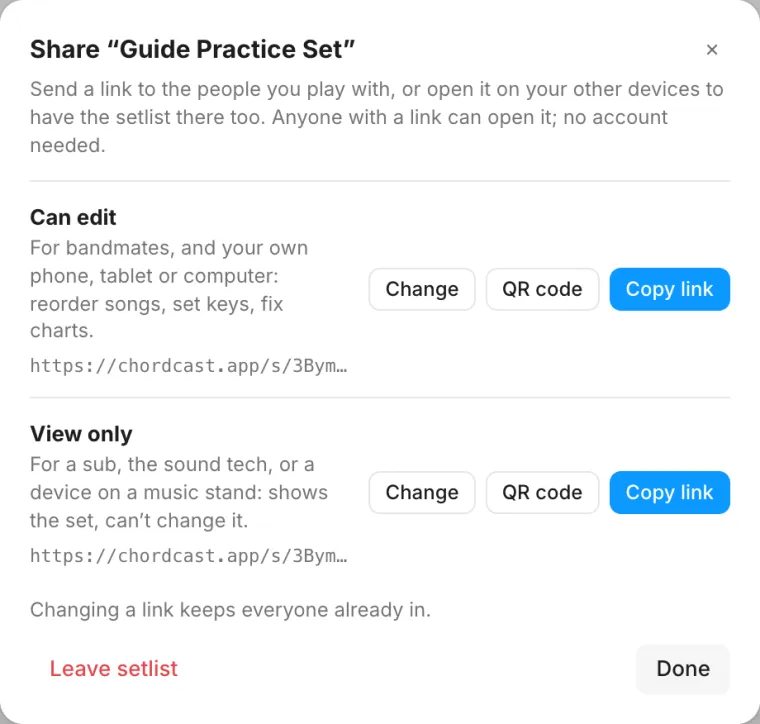
Step by step: Share setlists with a link.
Keys: one for the band, one for you
Set each song's key in the setlist, and everyone sees the chart in that key. A trumpet or sax player sets their instrument once under My Instrument (B♭, E♭ or F) and reads every chart in their own transposition, without changing anyone else's. Chords are re-spelled for the key, so you get B♭ rather than A♯ where it belongs.
On stage: follow the leader
Links keep everyone up to date between rehearsals. On stage you want something faster and independent of the venue's Wi-Fi. ChordCast's band sync uses Bluetooth between the devices in the room: whoever leads picks the song, and every other screen follows. Anyone missing a chart gets it from the band. Call a new key mid-set and it reaches everyone. How band sync works.
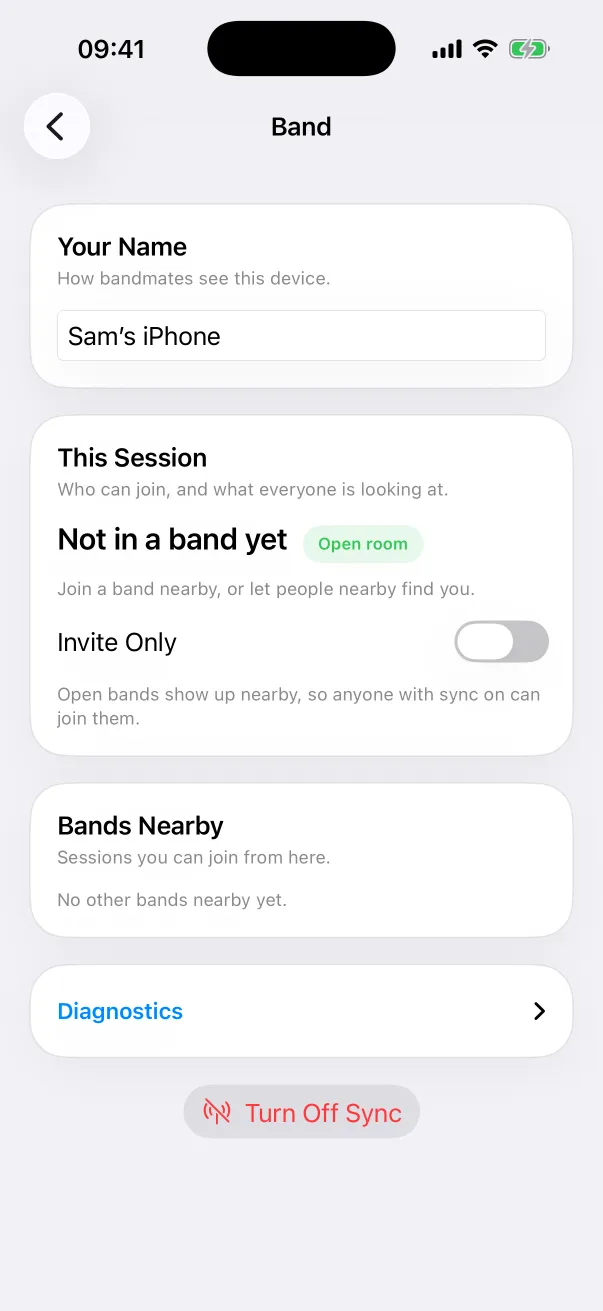
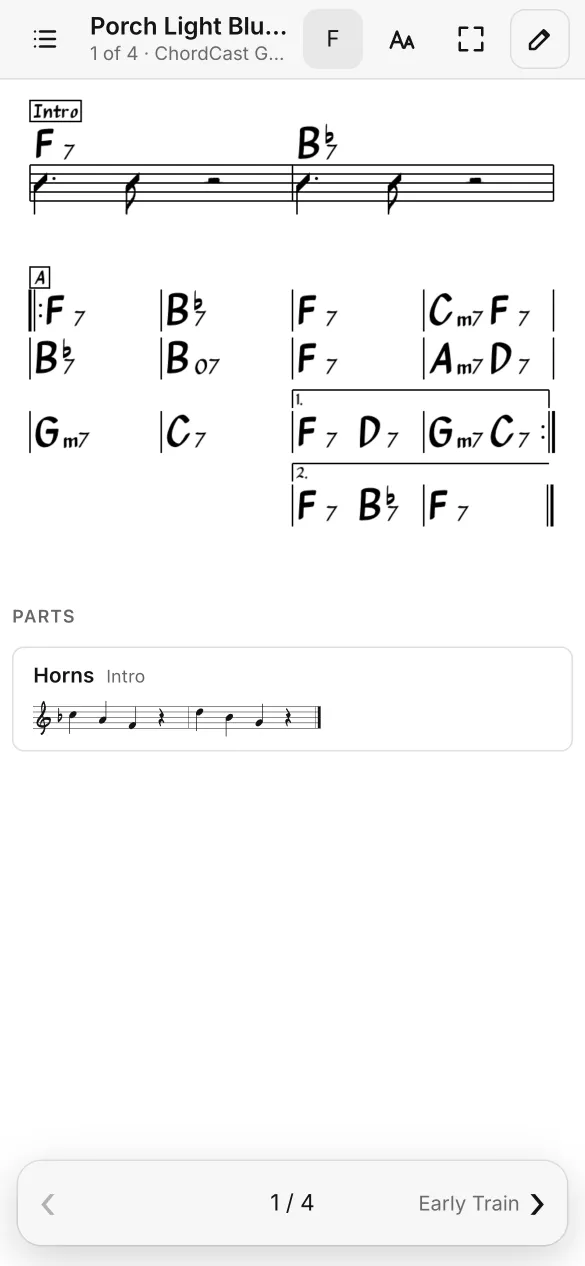
A checklist for the band
- One person builds the setlist and sets each song's key.
- Share it: edit links to the band, a view-only link to subs.
- Everyone opens it once on the device they'll bring, ideally on Wi-Fi, so it's saved for offline.
- Horn players set their offset.
- At the gig, everyone turns on band sync; the leader takes the lead.
- Fix things as you go. Changes reach the band and the cloud copy.
Questions
Does everyone need the app?
No. A setlist link opens in any browser, with a full-screen Perform mode for reading on stage. Following a leader over Bluetooth needs the app.
Can I bring charts we already have?
If they're in iReal Pro, yes: import them. Otherwise, type or tap them into the editor; a chart takes a few minutes.
What if two people edit at once?
Edits to different bars are both kept. If two people change the same bar, the newer edit wins.
Can we print?
The web app has Download PDF for a song or a whole setlist.